bestcrosswords.com is my go-to online quick crosswords website. It hosts American-style 15x15 free-to-play puzzles at different difficulty levels. According to them, they’re “the largest supplier of free crossword puzzles on the web, publishing 15 grids daily from an archive of more 100,000”. That’s awesome! You know what’s not awesome? Asking for a payment to fullscreen a crossword twice.
Thank you for providing such good puzzles for free, but no thank you to this specific request. This clearly seems like a flag they’d want to store per-device. Because accounts aren’t involved yet, the only two reasonable methods are cookies and localStorage. I happened to check the right one first.

Hehe. Presumably a timestamp of when the user last used fullscreen. So if the key is no longer there, like the first load, no more blockers?
delete localStorage["com.bestcrosswords.applet.solvable.SolvableCrosswordPuzzleApplication/settings/setFullScreen"];
Yes. No more blockers. Only until the next time you use fullscreen though, of course.
Multiple ways to fix that. Adding a button to delete the timestamp is the simplest and easiest, but we can do better. Possibly made using GWT (pronounced gwit), the page’s event handler code is obfuscated. Luckily though, the fullscreen “button” contains a single click event listener. And it’s returned by the element’s onclick property.
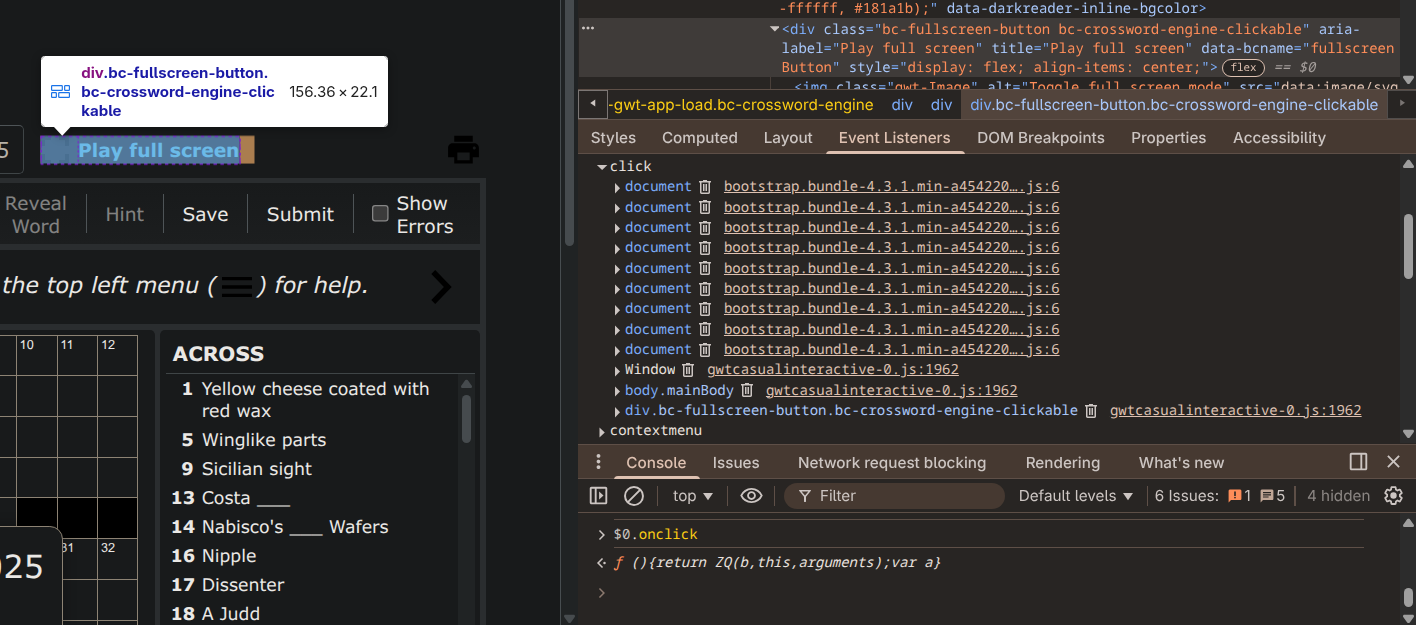
This makes things easy. A simple hack would be to just overwrite onclick with a function that deletes the timestamp and calls the original handler.
const button = document.querySelector("#gwt_casualinteractive div.bc-fullscreen-button");
const originalHandler = button.onclick;
button.onclick = function() {
    delete localStorage["com.bestcrosswords.applet.solvable.SolvableCrosswordPuzzleApplication/settings/setFullScreen"];
    originalHandler.apply(this, arguments);
}
Sweet! We know have infinite fullscreen toggle-ability.
Slightly unfortunately though, this hack cannot be run on window load, as the inner game DOM is loaded separately. Multiple ways to fix that too. Considering the simplicity of the situation, a timed loop to check the existence of the button is good enough; no need for more sophisticated solutions.
A sample user script that checks for the button every two seconds, for a maximum of ten times:
// ==UserScript==
// @name         BestCrosswords Fullscreen De-limiter
// @version      1.0
// @description  Removes the paywall for more-than-once fullscreen toggle.
// @namespace    https://krove.space/
// @author       Krove
// @match        https://www.bestcrosswords.com/*
// @icon         https://www.google.com/s2/favicons?sz=64&domain=bestcrosswords.com
// ==/UserScript==

(function() {
    'use strict';

    const checkIntervalMs = 2000;
    const maxCheckCount = 10;
    let currentCheckCount = 0;

    function getFullscreenButton() {
        return document.querySelector("#gwt_casualinteractive div.bc-fullscreen-button");
    }

    function patchFullscreenButton(button) {
        const originalHandler = button.onclick;
        button.onclick = function() {
            delete localStorage["com.bestcrosswords.applet.solvable.SolvableCrosswordPuzzleApplication/settings/setFullScreen"];
            originalHandler.apply(this, arguments);
        }
    }

    function patchOrSchedule() {
        if (++currentCheckCount > maxCheckCount) {
            return;
        }

        const button = getFullscreenButton();
        if (button === null) {
            setTimeout(patchOrSchedule, checkIntervalMs);
        } else {
            patchFullscreenButton(button);
        }
    }

    window.addEventListener('load', patchOrSchedule);
})();